Sign-off and magic links
Last reviewed: 2026-05-24
When an admin assigns a policy to you, Accedo sends a signing-request email to your inbox. That email is the entry point — you do not need to remember a password or hunt around for the right URL. See Assignments overview for how assignments get to you in the first place.
Signing off
Open the email and tap the magic link. The link drops you straight into the signing page for that specific policy — no password screen, no second login. If you happen to already be signed in to Accedo as a different user, the page silently signs you out and re-authenticates as the correct signer so you cannot accidentally sign on someone else's behalf.
From here:
- The full policy document is embedded inline. Scroll through it, or open it in a new tab if you prefer a larger view.
- Below the document, tick the electronic-signature consent checkbox. The button stays disabled until you do — this is the affirmative consent that makes the signature count under ESIGN.
- Click I Acknowledge and Sign. You will see a green "Policy Signed Successfully" confirmation and a Download Certificate button.
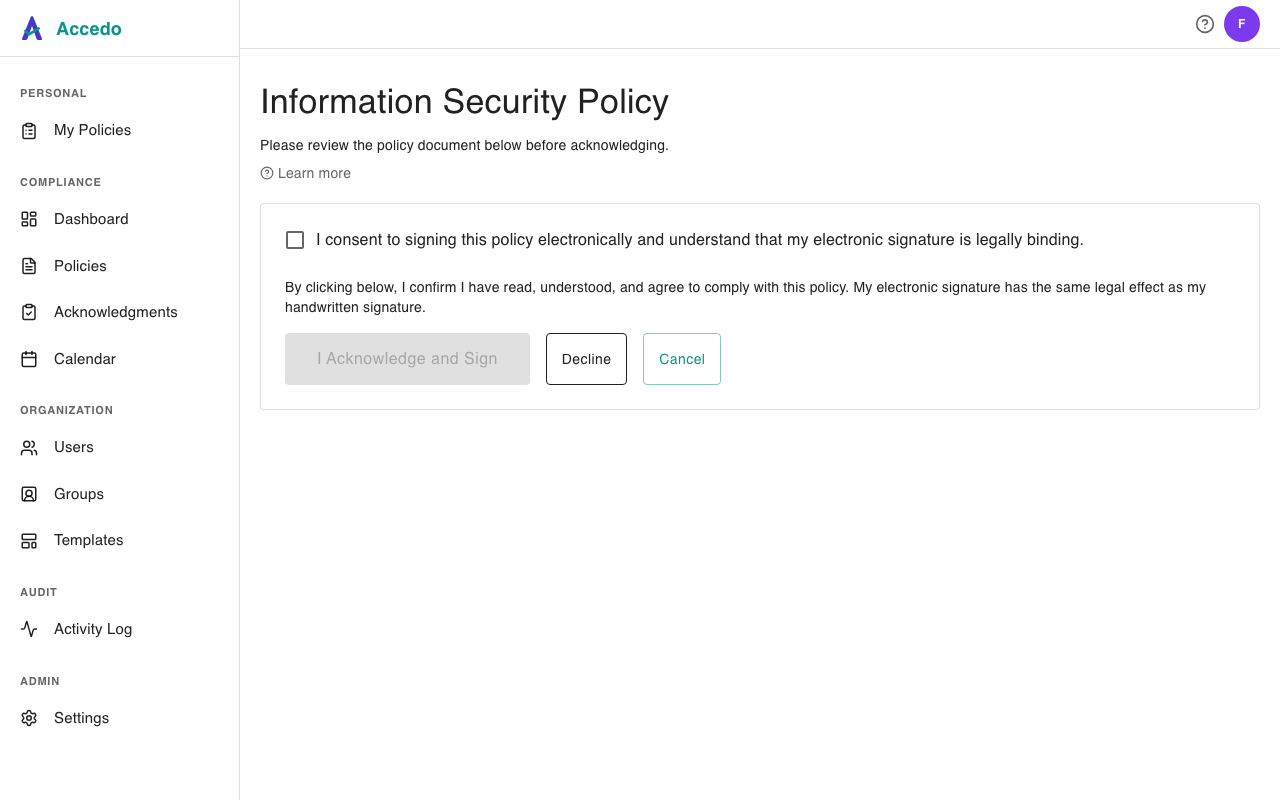
If you would rather not sign — for instance, the policy does not apply to your role — use the Decline button on the same page instead. See Declines, exceptions, and overdue items for what that does.
What gets recorded
The moment you click I Acknowledge and Sign, Accedo writes a signature row against your assignment with:
- The exact timestamp of the click (UTC).
- Your IP address and browser user agent.
- The fact that you ticked the consent checkbox, plus the version of the consent text you agreed to — so we can prove which language you saw if the wording is ever updated.
A Certificate of Completion PDF is generated immediately and stored against the assignment. You can download it from the success screen, or later from the Signed section of your My Policies page — the certificate stays available for the policy's full retention window. Your admin's Acknowledgments view will also flip the row to SIGNED in real time, so they can see you are current without you needing to confirm anything by email.