Assignments overview
Last reviewed: 2026-05-24
An assignment is one signer's obligation to acknowledge one specific policy. Policies on their own do nothing — they sit in your library until you assign them. Each assignment is its own row: a pairing of a single user with a single policy, with its own status, its own due date, and (once signed) its own certificate.
Lifecycle
Every assignment moves through the same path:
- Pending — the row is created the moment an admin assigns the policy. A signing-request email goes out at the same time. The assignment stays pending until the signer takes action.
- Overdue — if you set a due date and that date passes without a sign-off, the row flips to overdue. It is still actionable — the magic link still works — but it now surfaces in the admin's Overdue filter and gains a red chip on the signer's My Policies page. See Declines, exceptions, and overdue items.
- Signed — the terminal "yes" state. A Certificate of Completion PDF is generated and the row records the exact timestamp, IP address, and consent text the signer agreed to. See Sign-off and magic links.
- Declined — the terminal "no" state. A first-class, audited refusal, not an error: the signer chose Decline because the policy did not apply. The row is still resolved, the admin is notified by email, and a decline certificate is stored against the assignment.
For recurring policies (annual, quarterly, semi-annual), a fresh assignment is created at the start of each new period, with its own pending/overdue/signed lifecycle. Last period's signed row stays on file as historical proof.
Where assignments appear
Admins see assignments in two places: on a policy's detail page, the Acknowledgments tab lists every assignment for that one policy with per-row status and reminder controls; the workspace-wide Acknowledgments page rolls every assignment across every policy into one filterable table, with status, period, due date, and search-by-user filters.
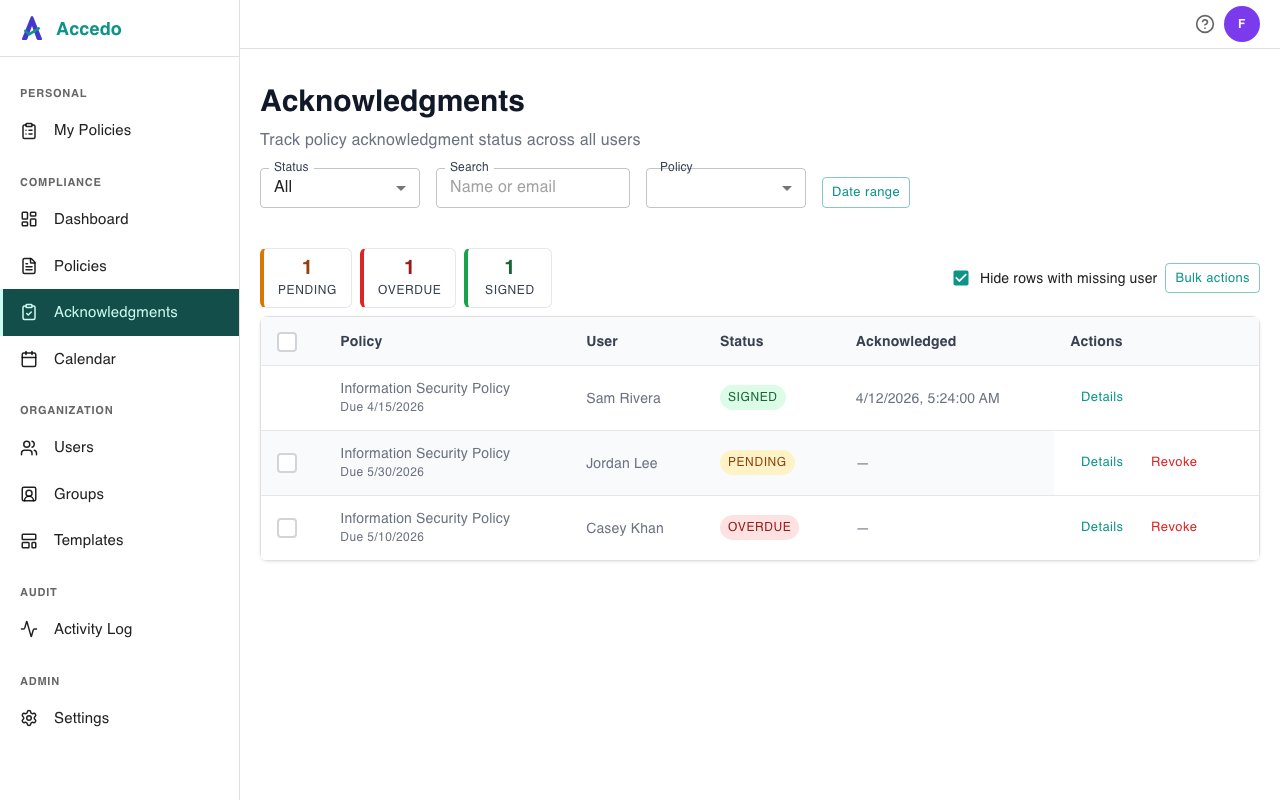
Signers do not see "assignments" by name — they see their My Policies page (the Signer Portal), which groups their pending, signed, and declined rows into three clear sections, plus the magic-link email that drops them straight into a signing screen.